Benefits user rights
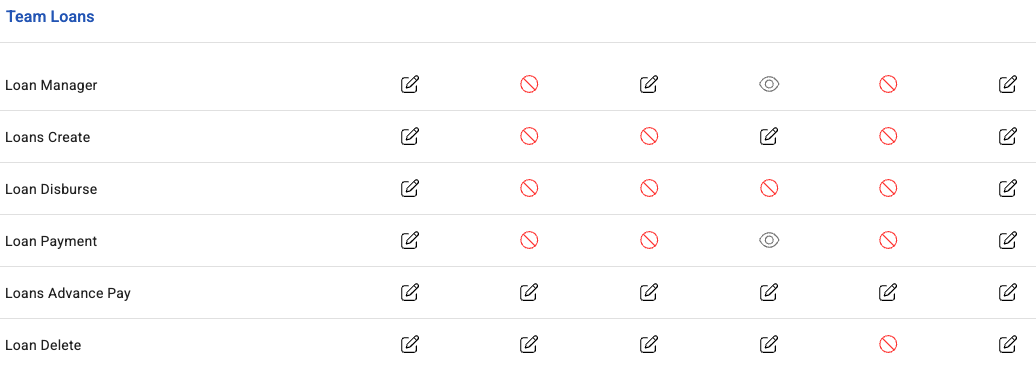
Benefits rights are granular for the same reason payroll's are: this module lends money, releases it, and takes it back through payroll. Who can do which of those should be a deliberate decision.
Where: Benefits › Rights You need: the user rights permission
The rights, and what each allows
| Right | Allows |
|---|---|
| Loan request | Requesting a loan |
| Loan create | Creating loans for employees |
| Loan manager | Managing loans |
| Loans manager | Managing loans across the team |
| Loan disburse | Releasing the money |
| Loan payment | Recording repayments |
| Loan delete | Deleting loans |
| Advance pay | Access to advance wages / QuickPay |
| Loan type settings | Configuring lending products |
The separations that matter
Create and disburse should be different people. One sets up the loan, another releases the funds. This is the same control as separating payroll's processor and payer, and for the same reason — it is the basic protection against both fraud and honest error.
Loan type settings is a policy right, not an operational one. Whoever holds it decides what the company lends, at what cost, to whom. That is a finance and HR policy decision, and it should sit with very few people.
⚠️ Loan delete removes a lending record. Give it sparingly and prefer statuses — rejected, expired, cancelled — over deletion, so the history of what was requested and decided survives.
How to grant benefits rights
- Open Benefits › Rights.
- Select the person.
- Grant the rights their role requires — and no more.
- Save, and have them confirm what they can see.
What Happens Next
- Rights apply immediately; the person may need to reload.
- Employees can always see their own loans and advances without any right being granted.
- Removing a right does not alter records the person created while they held it.
Tips
- Separate create from disburse from day one. Retrofitting the split after something goes wrong is a much worse conversation.
- Keep disbursement narrow. It is the right that moves money out of the company.
- Review after any role change. Benefits access outlives job moves, and the data is sensitive — loan balances say a great deal about someone's circumstances.
- Do not grant loan delete as a convenience. Deleting a loan removes the record of a financial decision.
- Treat loan type settings as a policy permission, held by whoever owns the lending policy rather than by whoever administers it.
Troubleshooting / FAQ
Q: Someone cannot see an employee's loan. Their benefits rights do not cover that employee.
Q: Someone can create a loan but not release the money. Correct, if they have create and not disburse. That is the intended separation.
Q: An employee cannot see their own loan. That does not need a right. If it is missing, check the loan exists against their profile.
Q: Who should hold loan type settings? Whoever owns the lending policy — it decides the terms offered to everyone.
Screenshots
These screenshots came from our previous help centre and may show an earlier version of the interface.