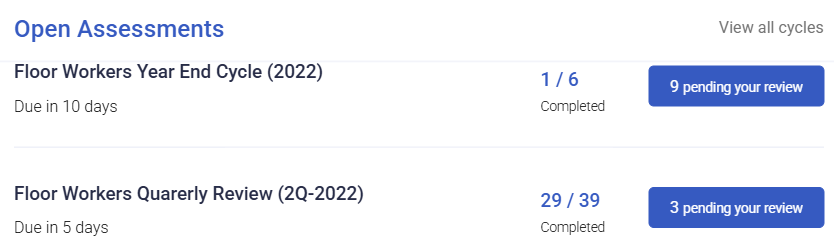
Reviewing team assessments
Reviewing is where an assessment becomes useful or becomes noise. The mechanics take minutes; the consistency is what determines whether the results mean anything.
Where: Performance › Team › Assessments You need: performance rights covering your team
How to review
- Open Performance › Team › Assessments.
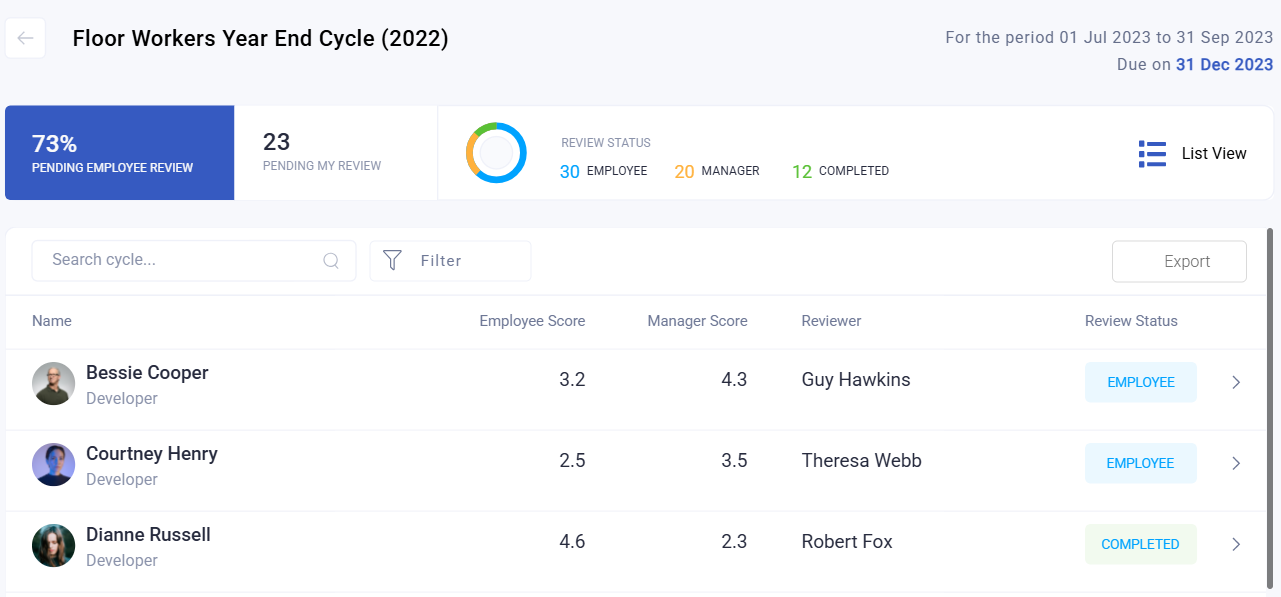
- Filter by state to find what is waiting on you — pending on reviewer.
- Open the assessment and read the employee's own answers first.
- Complete your part.
- Submit.
Reading the employee's answers before writing yours is worth the extra minute. A review that contradicts a self-assessment without acknowledging it reads as if nobody looked.
Rating consistently
Ratings run 1 to 5, and they map directly onto performance bands:
| Rating | Band |
|---|---|
| 1–2 | Below |
| 3 | Meets (bottom of the band) |
| 4–5 | Exceeds |
⚠️ A 4 places someone in Exceeds. Reviewers who treat 4 as "good, no complaints" push their whole team into the top band, which makes the reporting useless and is unfair to the people genuinely exceeding. Agree what each number means before the cycle closes.
The most common problem in performance data is not harshness — it is that different reviewers use the scale differently. One generous reviewer moves an entire team a band relative to their peers.
What Happens Next
- The assessment moves to completed once both parts are in.
- Scores are computed from the answers and feed team reporting and the talent grid.
- Completed assessments become the record of that cycle for that employee.
Tips
- Calibrate before you close the cycle, not after. A short conversation between reviewers about what 3 and 4 mean is the single highest-value thing you can do for the quality of the data.
- Write the comment for the employee, not the file. They will read it, and a comment that only makes sense to HR helps nobody.
- Do not rate everyone identically to be kind. A flat distribution removes the ability to recognise anyone.
- Review your own team's distribution before submitting. If everyone is a 4, ask yourself whether that is true.
- Deal with pending reviews in one sitting. Reviews written across three weeks are inconsistent with each other, never mind with other reviewers.
Troubleshooting / FAQ
Q: I cannot see a team member's assessment. Check your performance rights cover them, and that the cycle includes them.
Q: The assessment is stuck pending on the employee. They have not completed their part. The state names who is holding it.
Q: Can I change a rating after submitting? Scores recompute from current data, so a change moves the result. Treat submission as final unless there is a genuine error.
Q: The employee disagrees with the rating. That is a conversation, not a data problem. The record shows both their answers and yours.
Q: Everyone on my team scored highly. Is that a problem? Possibly the assessment design — multi-select questions award full marks to everyone. Check that before concluding anything.
Related articles
- How assessment scores are calculated
- Performance scores and the talent grid
- Creating an assessment cycle
Screenshots
These screenshots came from our previous help centre and may show an earlier version of the interface.