Creating and editing tickets
A ticket is one unit of work: a bug, a task, a story. It is also the only durable record of why something was done — so the effort you put into a ticket is repaid every time someone reads it six months later without you in the room.
Where: Tickets can be created from My Work, the board, List view's Create issue, or a blank ticket page You need: access to the project — see Projects and access
When to use this, and when not to
| You want to record | Use |
|---|---|
| A piece of work with an owner and a deadline | A ticket |
| A step of an existing ticket | A subtask |
| A large initiative many tickets deliver | An epic |
| A ritual you repeat each cycle | A template |
| A backlog you already have in a spreadsheet | Import |
How to create one
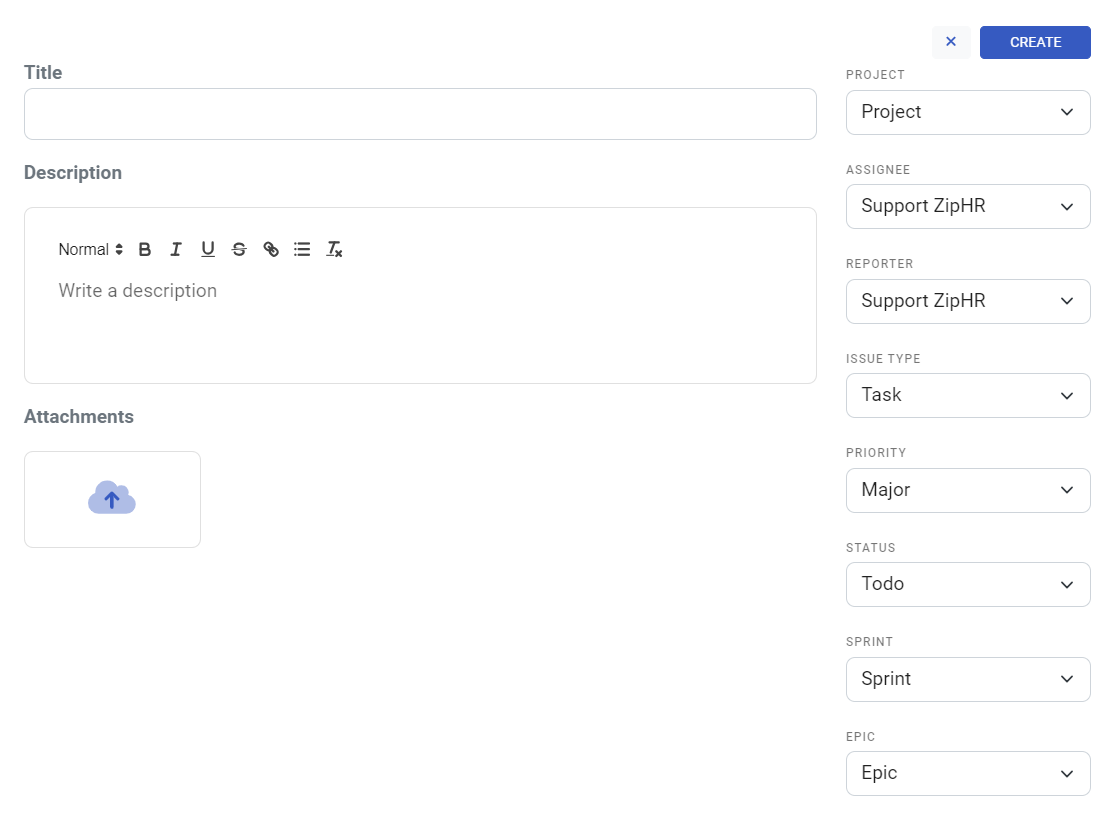
At minimum a ticket needs a project, a title and an issue type. It gets a key from its project — KDV-123 — which never changes and is how people will refer to it in conversation, branches and merge requests.
💡 If your company has Ticket Standards set up, write the title in that format — or write anything and press Fix title to standard afterwards. The standard exists so a board full of tickets reads as one system rather than twelve personal styles.
The description, and its AI help
The description is where the actual brief lives. KAMI Tasks has AI actions built into the editor so a thin description does not stay thin:
- Generate from title — drafts a description from nothing but the title
- Improve existing description — tightens what is written
- Rewrite from comments — folds a long comment thread back into the description, so the ticket's story lives in one place
- Add acceptance criteria — appends a concrete done-when list
- Fix description to standard / Fix title to standard — rewrites onto your company's standards in one click
The AI never invents facts that are not in the ticket — it restructures what is there. A one-line ticket produces a one-line description no matter which button you press, which is itself useful feedback.
The fields, and what they are for
| Field | What it does |
|---|---|
| Assignee | Who is doing the work. One owner — accountability does not split well |
| Reporter | Who raised it |
| Issue type | Epic, Story, Task, Bug, Improvement or Subtask |
| Priority | Trivial → Minor → Major → Critical → Blocker |
| Status | Where it sits in the workflow — see Statuses, priorities and ticket types |
| Sprint | Which sprint the work is planned into |
| Epic | The larger initiative it belongs to |
| Story points | Size estimate, feeding velocity |
| Original estimate | Time estimate, with Calculate Start Date to work dates backwards |
| Start / due dates | When the work runs |
Also on the ticket page
- Comments with reactions; mention someone with @ to pull them in
- Attachments — drop files onto the ticket
- Subtasks and linked tickets — see Epics, subtasks and linked tickets
- Work log — time logged against the ticket, see Estimates and logging time
- Watchers — follow a ticket without owning it, via Watch options / Add watchers
- History — every change, who and when
- Merge Requests — if GitLab is connected, branches, MRs and pipeline status appear here automatically
- Share and copy link
What Happens Next
- The ticket appears on the board and in List view, and on the assignee's My Work.
- If it has a due date, it starts counting toward overdue; without one it can never be overdue, which is either fine or a problem depending on the ticket.
- Watchers and the assignee are notified — see Notifications.
- With GitLab connected, a branch named after the ticket key links its code back automatically.
Tips
- Write the description for someone who was not in the meeting. That is who reads it. If it only makes sense with context you happen to hold, the ticket is a reminder, not a brief.
- One assignee, always. Two names means nobody.
- Keep the description current — when the plan changes in the comments, use Rewrite from comments. The next person reads the description, not forty comments.
- Set a due date on anything that matters. Undated tickets are invisible to every overdue view and every automation.
- Use the AI to fix, not to author. It restructures what is in the ticket; the thinking is still yours.
Troubleshooting / FAQ
Q: "You don't have access to this issue." The ticket is in a project your groups cannot see. Access comes through groups — see Projects and access.
Q: The AI actions produce something vague. There is not enough in the ticket to work from. Add a sentence of real detail and try again.
Q: No merge requests are showing. The branch name must start with the ticket key (KDV-123-…). See Integrations.
Screenshots
These screenshots came from our previous help centre and may show an earlier version of the interface.