Creating an assessment cycle
An assessment cycle asks a set of questions about a group of people over a defined period. Getting the questions right before it starts is the whole job — once people have answered, changing them is unfair and changes the scores.
Where: Performance › Settings › Cycles You need: the right to create cycles
Before You Start
Decide what the cycle is for. Development conversations and pay decisions need different questions, and telling people which it is changes how honestly they answer.
Write the questions and have someone else read them. Ambiguous questions produce noise, and you only find out after the cycle.
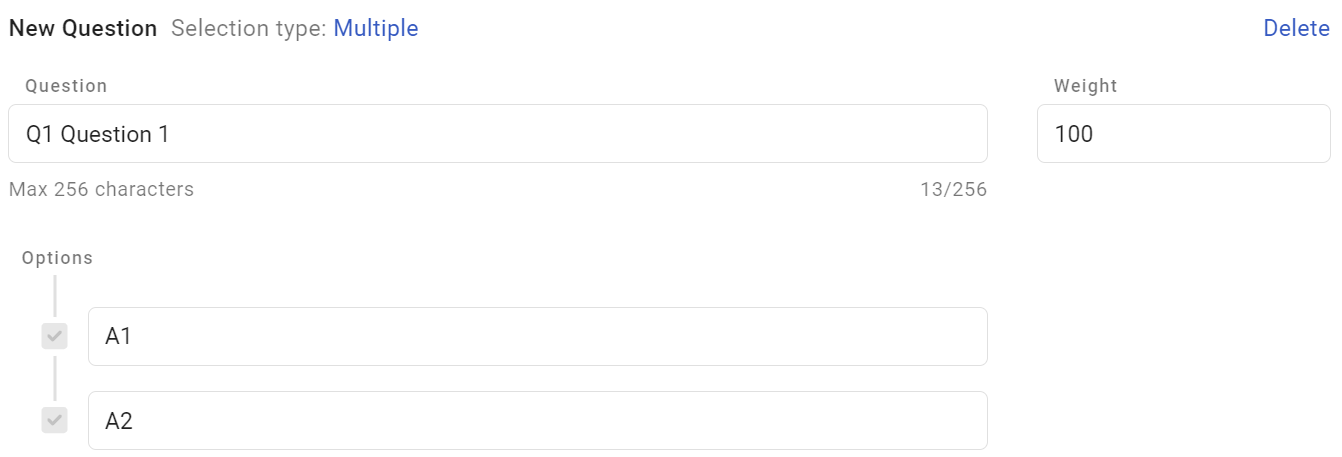
Check your question types. This is the one that costs most:
⚠️ Multi-select questions always award the maximum score, whatever is chosen. They cannot distinguish between employees, and they inflate everyone's score equally. Use them to gather information, never to score. See How assessment scores are calculated.
Order every question's options consistently — most positive first, every time. Mixed direction produces scores that are arithmetically right and meaningless.
How to create the cycle
- Open Performance › Settings › Cycles and create an assessment cycle.
- Set the period — when it opens and when it closes.
- Build the questions, with ordered answer options.
- Choose the participants and their reviewers.
- Publish the cycle.
The cycle's states
| State | Waiting on |
|---|---|
| Pending on employee | The employee to complete their part |
| Pending on reviewer | The reviewer to complete theirs |
| Completed | Nobody — it is done |
Because the state names who is holding it up, chasing is straightforward: filter by state rather than asking everyone.
What Happens Next
- Participants are notified and the cycle appears in their Performance area.
- Scores are computed from the answers, so they exist as soon as the assessment is answered.
- Completed assessments feed team reporting and the talent grid.
- Editing questions on a live cycle changes what has already been answered — avoid it.
Tips
- Pilot with one team. Every design problem shows up in the first ten responses, and fixing it before the company-wide run costs nothing.
- Keep it short. A long assessment produces rushed answers, and rushed answers are noise regardless of how good the questions are.
- Separate self-assessment from reviewer questions deliberately, so each is answering what they can actually observe.
- Set the closing date with enough working days, and expect to chase. The cycle states tell you exactly whom.
- Do not reuse last year's questions without reading them. Roles change, and a question that made sense then may not now.
Troubleshooting / FAQ
Q: Everyone is scoring near the top. Check for multi-select questions, which award maximum to everyone, and for questions with a single option.
Q: An employee cannot see their assessment. Check they are a participant in the cycle and that it has opened.
Q: Can I add someone after the cycle has started? Adding a participant mid-cycle gives them less time; decide whether their result is comparable before doing it.
Q: We need to fix a question wording mid-cycle. Avoid it. Anyone who has answered responded to the previous wording, and scores recompute.
Q: Who chases the outstanding ones? Filter by state — pending on employee versus pending on reviewer tells you who to contact.
Related articles
- How assessment scores are calculated
- Reviewing team assessments
- Recurring cycles and automations
- Getting started with Performance
Screenshots
These screenshots came from our previous help centre and may show an earlier version of the interface.