Reimbursement and payment
An approved claim is a decision; paying it is a separate step. This is where expenses meet payroll and your bank, and where an employee finds out whether "approved" meant "paid".
Where: Expenses › Claims
You need: expense rights including payment
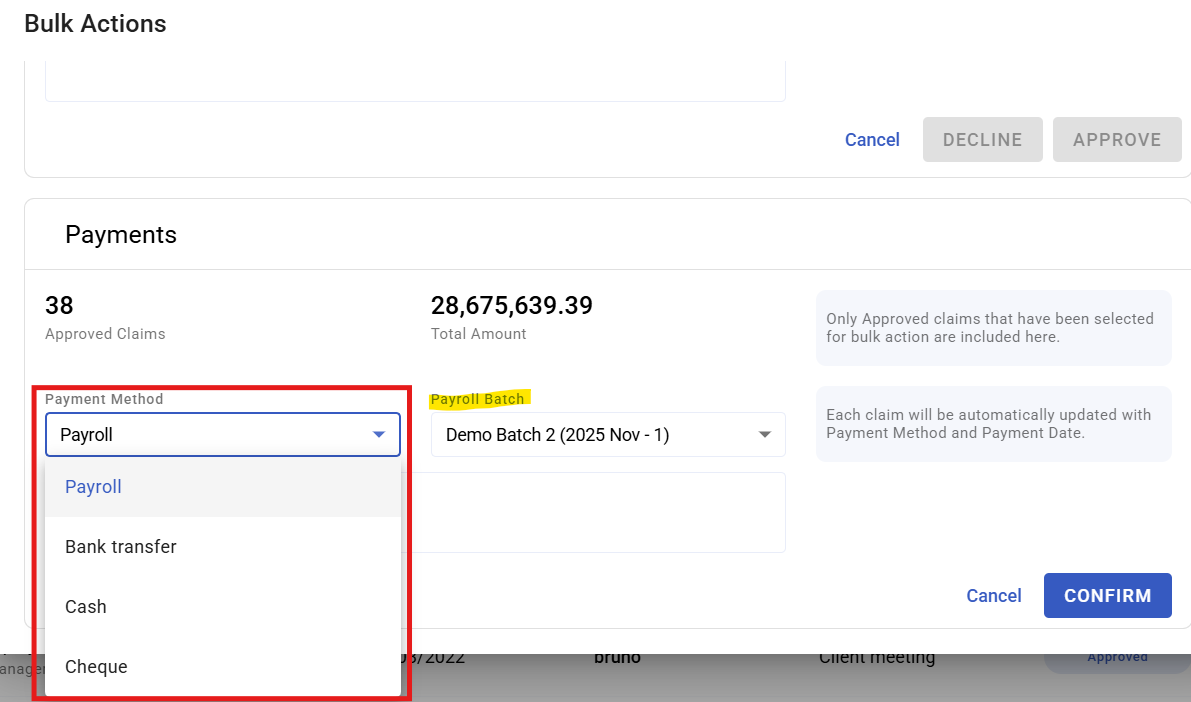
The four payment methods
| Method | Suits | Reaches the employee |
|---|---|---|
| Payroll | Routine reimbursement | With their next payslip |
| Bank transfer | Larger or urgent amounts | On your payment run |
| Cash | Small amounts, petty cash | Immediately |
| Cheque | Where finance requires it | On clearing |
Payroll is the tidiest default for routine claims. It needs no separate payment run, it is recorded against the employee, and they can see it on their payslip. The trade-off is timing: a claim approved just after a payroll cut-off waits for the following run.
Use bank transfer where waiting until payday is unreasonable — a large travel claim someone has funded personally is the obvious case.
Payment status
| Status | Means |
|---|---|
| None | Not yet marked for payment |
| Pay now | Marked for payment |
| Paid | Money released |
Approved is not paid. They are separate states and separate actions, and most "where is my money" questions come from assuming otherwise.
Reimbursing through payroll
Expenses paid this way appear on the payslip as a reimbursement rather than as earnings. That distinction matters: a reimbursement is repaying the employee's own money, not paying them for work, and it should not be treated as taxable income.
Because it lands on a payslip, the timing follows the payroll cut-off — see Running a payroll batch cycle.
How to pay approved claims
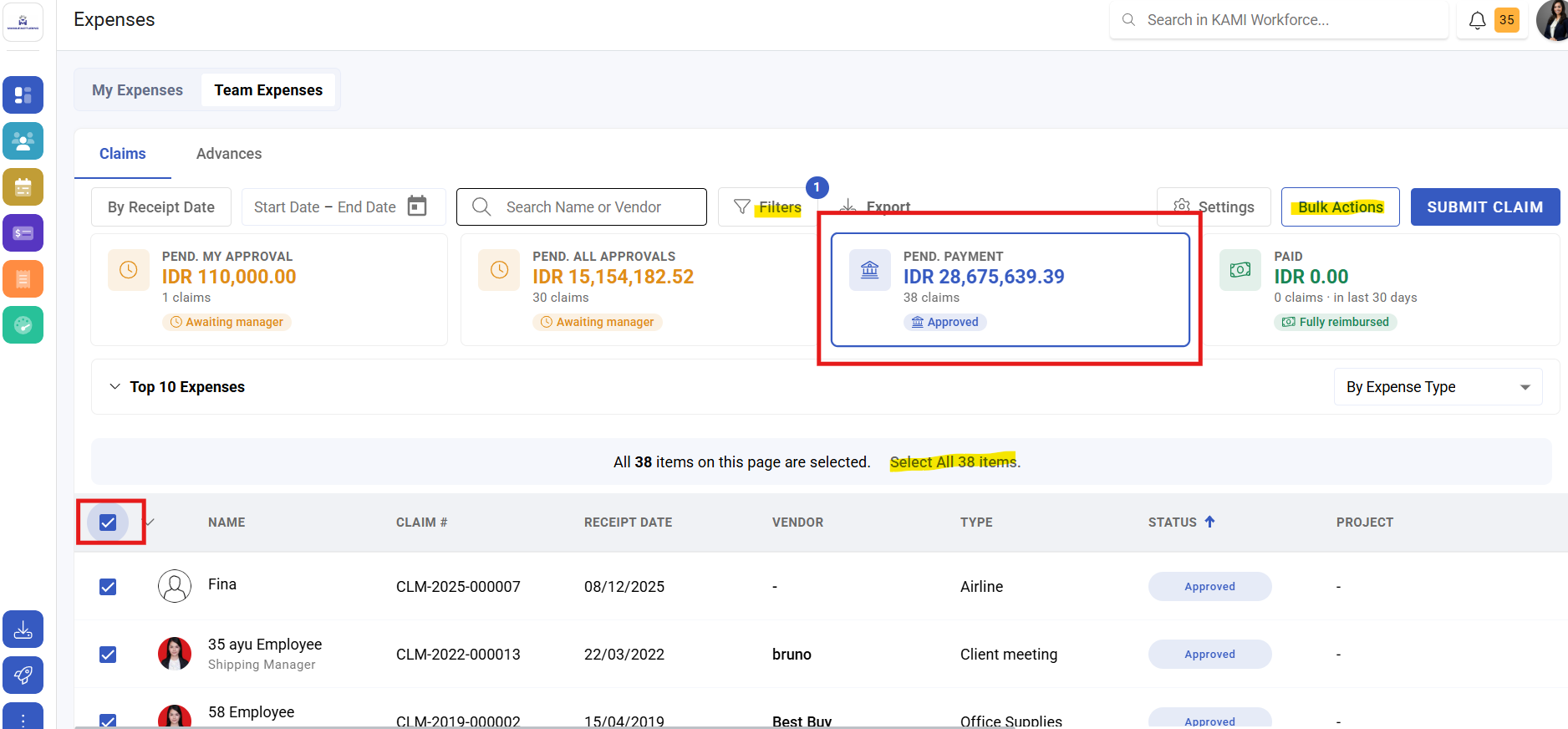
- Open Expenses › Claims and filter to approved.
- Select the claims and mark them for payment.
- Process by the configured method — for payroll, they flow into the next run.
- Confirm the status reaches paid.
What Happens Next
- Paid claims are closed and appear in expense reporting.
- Claims paid through payroll appear on the payslip for that run.
- Classification and cost centre carry the amounts into your accounts.
- A paid claim should be treated as final; corrections are new transactions, not edits.
Tips
- Pay on a predictable cycle and tell people what it is. Most expense frustration is uncertainty about timing rather than the wait itself.
- Reconcile expense payments against your bank and payroll each period. An approved-but-unpaid claim is invisible unless someone looks.
- Watch claims approved just after a payroll cut-off. They wait a full cycle, and the claimant rarely realises.
- Use bank transfer for anything an employee has funded personally and substantially. Making someone wait three weeks for a large sum they advanced is a retention issue, not a process one.
- Do not correct an overpayment by editing the claim. Handle it as a recovery so the record matches what moved.
Troubleshooting / FAQ
Q: A claim is approved but the employee has not been paid. Approved and paid are separate. Check whether it was marked for payment and whether the run has happened.
Q: A reimbursement did not appear on the payslip. Check it was marked for payment before the payroll cut-off, and that the payslip was calculated afterwards.
Q: Is a reimbursement taxable? It is repaying the employee's own spending, not income. If it is appearing as earnings, check how it is configured.
Q: Can we pay part of a claim now and part later? Not as one claim. Decline and ask for separate claims, so the record matches the payments.
Q: An employee was paid twice. Recover it as a separate transaction rather than editing the claims.