Loan types
A loan type is a lending product: how much can be borrowed, for how long, at what cost, and who qualifies. Every loan an employee takes is an instance of one, so the type is where your lending policy actually lives.
Where: Benefits › Types You need: the benefits settings right
Before You Start
Agree the policy first — amounts, terms, fees, interest and eligibility — with whoever owns it. A loan type is a financial product, and the settings here determine what employees are contractually offered.
Check the regulatory position. Lending to employees, and charging for it, is regulated in most places. Confirm what you may charge before configuring a fee or an interest rate.
What a loan type controls
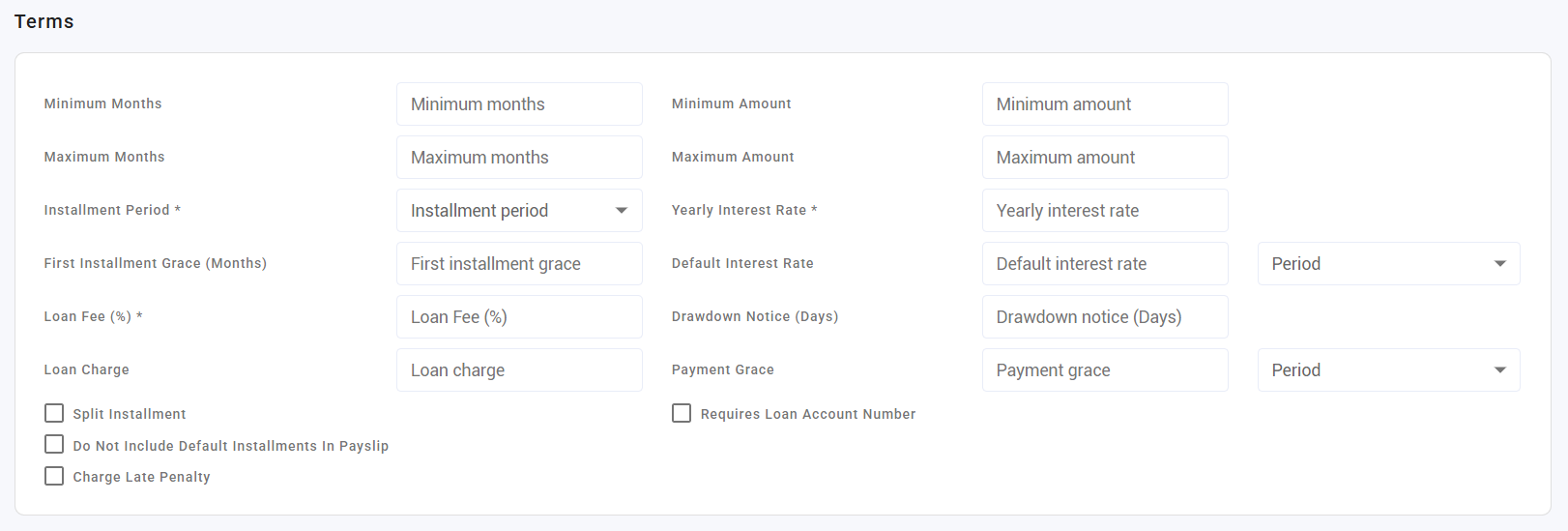
Amounts and terms
| Setting | Decides |
|---|---|
| Minimum / maximum loan amount | The borrowing range |
| Minimum / maximum months | The repayment term range |
| Instalment period | How often instalments fall |
| Minimum wage multiple | Borrowing capped as a multiple of wage |
Cost
| Setting | Decides |
|---|---|
| Minimum fee | A floor on the fee charged |
| Percent fee | A fee as a percentage of the loan |
| Default interest rate and its period | The interest applied |
| Yearly interest rate | The annualised rate |
| Charge late penalty | Whether missed instalments attract a penalty |
Eligibility and process
| Setting | Decides |
|---|---|
| Minimum months of service | How long someone must have worked before borrowing |
| Drawdown notice days | Notice required before funds are released |
| First instalment grace | A delay before repayment starts |
| Payment grace and its period | Tolerance before an instalment counts as late |
| Split instalment | Whether an instalment can be split across payslips |
| Skip default instalments | Whether the default schedule is skipped |
| Required loan account number | Whether an account number must be recorded |
Which one, when
| You want to offer | Set up |
|---|---|
| A standard staff loan | One type with your usual limits and term |
| An emergency loan on softer terms | A separate type — do not bend the standard one |
| Early access to earned wages | Not a loan type — see KAMI QuickPay |
⚠️ Wage multiple and months of service are your real risk controls. They cap exposure to someone's actual earnings and to how long they have been with you. Amount limits alone do not do this — a large loan to a new joiner is within an amount limit and outside any sensible lending policy.
How to set up a loan type
- Open Benefits › Types.
- Create the type and name it for the product, not the audience.
- Set the amount range and the term range.
- Set the fee and interest terms.
- Set eligibility — minimum service, wage multiple.
- Set the process options — notice days, grace periods, late penalty.
- Test by creating one loan and reading the resulting schedule before publishing the type.
What Happens Next
- Employees can request loans of this type, within its limits.
- A loan captures its terms when it is created. Changing the type later does not alter loans already live — existing borrowers keep the deal they were given, which is what you want contractually.
- The repayment schedule is generated from the type's term and instalment period.
Tips
- Create one loan and read the whole schedule before offering the type. Fees, interest and grace periods interact, and the schedule is the only place you see the result.
- Write the employee-facing terms at the same time. If you cannot explain the cost in two sentences, the type is too complicated.
- Set the wage multiple deliberately. It is the control that keeps repayments affordable, and an unaffordable instalment becomes a hardship case rather than a repayment.
- Do not edit a type to fix one loan. Types apply to everyone; fix the loan.
- Deactivate rather than delete types you stop offering — live loans reference them.
Troubleshooting / FAQ
Q: An employee cannot request a loan. Check minimum months of service, the amount against the type's range, and the wage multiple.
Q: We changed the interest rate — did live loans change? No. Loans keep the terms they were created with.
Q: The instalment is higher than the employee expected. Check fees and interest on the type, and the term chosen. The schedule shows the composition.
Q: Can one employee have two loans? That is a policy question rather than a technical limit — decide it and apply it consistently, because outstanding balances stack in payroll deductions.
Screenshots
These screenshots came from our previous help centre and may show an earlier version of the interface.