Performance scores and the talent grid
The talent grid places people by how they are performing and which way they are moving. It turns a list of ratings into a view you can act on — provided you know what the bands actually mean.
Where: Performance › Reports You need: performance rights covering the employees shown
How a rating becomes a score
Ratings run 1 to 5. The grid converts them to a percentage by multiplying by 20:
| Rating | Score |
|---|---|
| 1 | 20 |
| 2 | 40 |
| 3 | 60 |
| 4 | 80 |
| 5 | 100 |
The three performance bands
| Band | Score | Rating |
|---|---|---|
| Below | under 60 | below 3 |
| Meets | 60 to 79 | 3 to just under 4 |
| Exceeds | 80 and above | 4 and above |
💡 The boundaries land exactly on whole ratings. A 3 is the bottom of Meets, and a 4 is the bottom of Exceeds. There is no partial credit between them unless your ratings carry decimals — so a reviewer choosing between 3 and 4 is choosing between two bands, not nudging a number.
Tell reviewers this. Most rating inflation comes from people treating 4 as "good" without realising it moves someone into Exceeds.
Trend
Trend compares an employee's score at the start of the window against the end:
| Trend | Change |
|---|---|
| Improving | up 3 points or more |
| Declining | down 3 points or more |
| Steady | within 3 points either way |
Three points is well under one rating step, so trend picks up genuine movement without treating ordinary variation as a signal.
Reading the grid honestly
The grid is only as good as the ratings behind it, and the ratings come from assessments and goals. Before drawing conclusions from it:
- Check your assessments are actually discriminating — multi-select questions award full marks to everyone and flatten the distribution. See How assessment scores are calculated.
- Check goal priorities are used. If every goal is Critical, weighting is doing nothing.
- Check reviewers rated consistently. One generous reviewer moves their whole team a band.
What Happens Next
- The grid reflects ratings in the period you select, with trend measured over its own window.
- It is a report, not a record — it changes as ratings change.
- Nothing in KAMI acts on a grid position. What follows is a management decision.
Tips
- Brief reviewers on the band boundaries before a cycle, not after. Knowing that 4 means Exceeds changes how carefully people rate.
- Look at the distribution before the individuals. If nearly everyone is in one band, the problem is the assessment design, not your workforce.
- Treat trend cautiously over short windows. Three points is a small movement, and one cycle is not a pattern.
- Never use the grid as the sole input to a pay or promotion decision. It summarises ratings; it does not know context.
- Check who is missing. Anyone without ratings does not appear, and absence from the grid is not a performance signal.
Troubleshooting / FAQ
Q: Everyone is in Meets. Ratings are clustered at 3. Check whether reviewers are defaulting to the middle and whether the assessment discriminates at all.
Q: An employee rated 4 shows as Exceeds — is that right? Yes. 80 is the bottom of Exceeds, and 4 × 20 = 80.
Q: Someone is missing from the grid. They have no ratings in the period.
Q: The trend says steady but the score clearly moved. It moved by less than 3 points.
Q: Two teams look very different. Is one better? Possibly, or their reviewers rate differently. Compare reviewer behaviour before concluding anything about the teams.
Related articles
- How assessment scores are calculated
- Goals and KPIs: how progress is calculated
- Reviewing team assessments
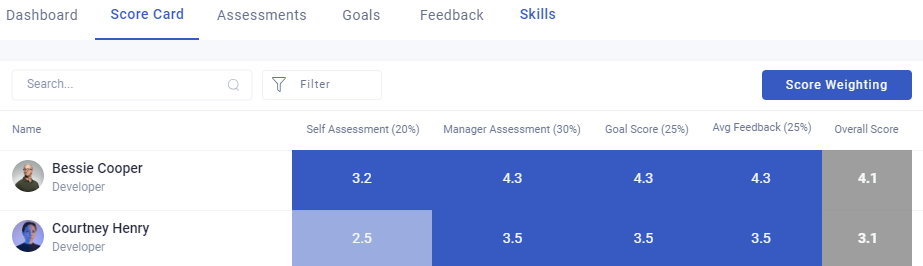
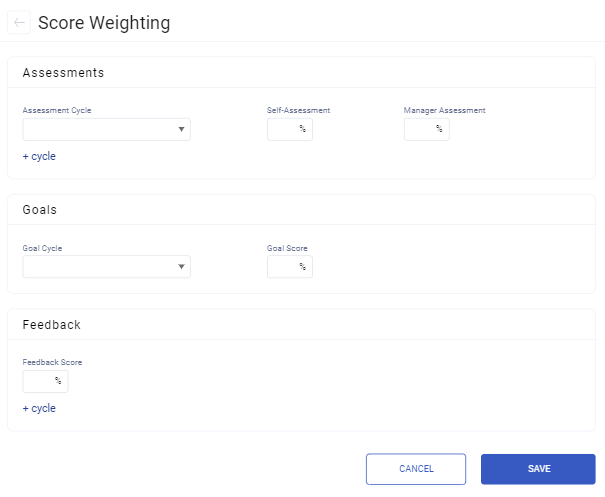
Screenshots
These screenshots came from our previous help centre and may show an earlier version of the interface.