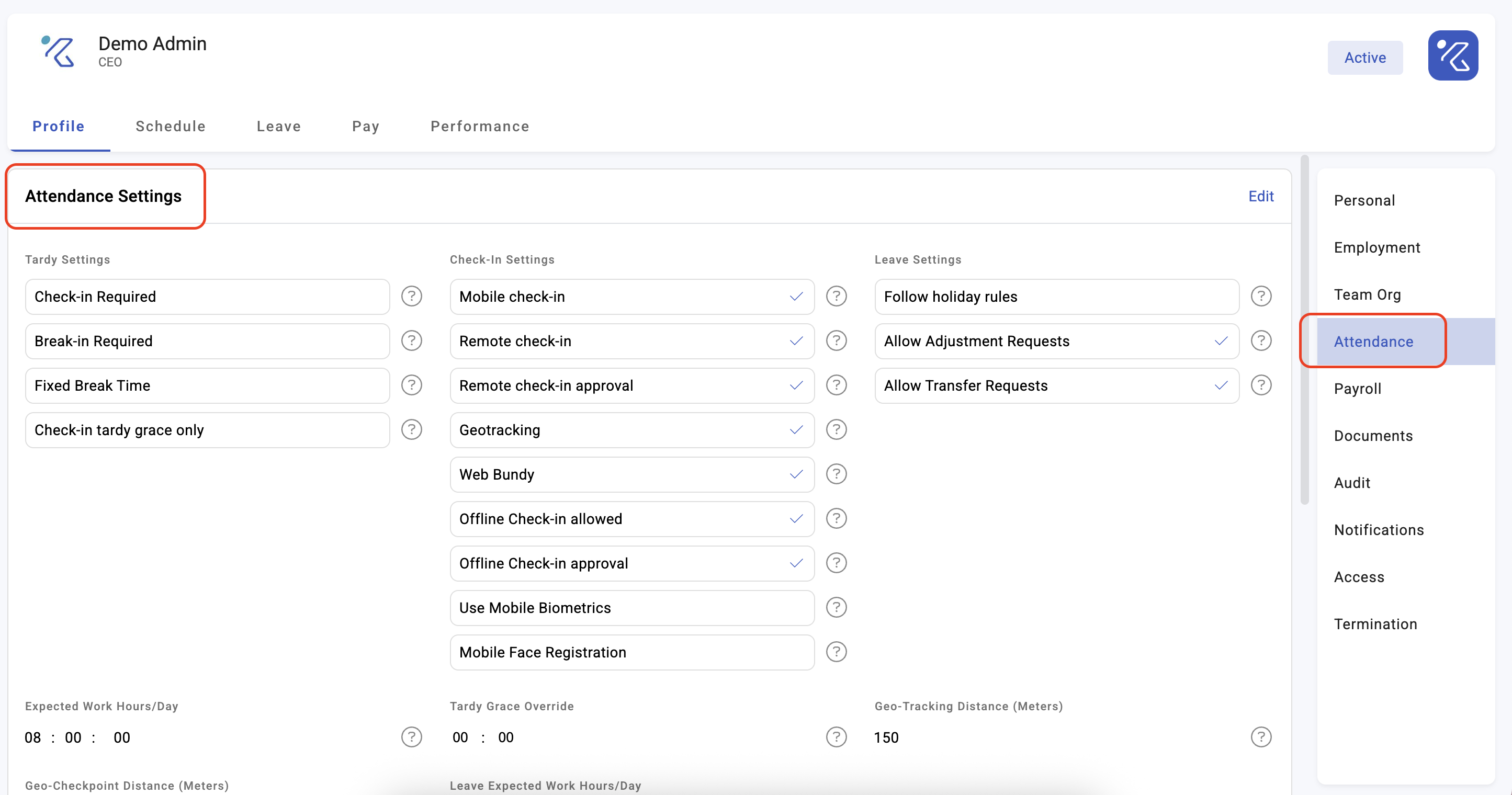
Attendance settings on an employee profile
Most attendance behaviour is set company-wide, on shifts and activities. But some settings belong to the person: their expected working hours, whether they must check in at all, how much lateness they are allowed. This article covers those per-employee settings and — importantly — how they interact with the company-wide ones, because the interaction is not always "the stricter wins".
Where: the employee's profile, attendance settings You need: the rights to edit employment information
When to use this, and when not to
| You want to change something for | Set it on |
|---|---|
| One person, permanently | Their profile — here |
| Everyone on a working pattern | The shift |
| Everyone doing a kind of work | The activity |
| Everyone in the company | Calendar rules |
| One day only | The event, or an event template |
Reach for the profile last. A setting changed on one person is invisible to whoever looks at the shift later and wonders why that employee behaves differently.
The settings that live on a profile
Expected working hours (EWH) — how long this person is expected to work in a day, defaulting to 8 hours. This is the single most consequential field on the list: everything about tardiness, under time and absence is measured against it.
Check-in required — whether this employee must check in at all. Turning it off suits salaried staff whose attendance is not tracked by tap. Note that an activity can override this: an activity set to not require check-in allows everyone on it to skip, regardless of the profile.
Break check-in required — whether breaks must be tapped, separately from the main check-in.
Break is fixed — whether the break is a fixed period rather than one the employee records.
Working tardy grace — how late this person may arrive before being counted tardy.
Tardy grace check-in only — whether the grace applies only to arrival, or to other timings too.
How profile settings combine with activity settings
Two rules matter, and they do not work the same way:
Tardy grace takes the larger of the two. Where both the profile and the activity define a grace period, KAMI uses the maximum, not the minimum. Setting a tight grace on the profile does not tighten anything if the activity is generous — a common surprise when someone tries to hold one employee to a stricter standard.
Check-in required can be switched off by the activity. The activity setting exists to let everyone on that activity avoid checking in, and it overrides the profile requirement.
The practical implication: per-employee settings loosen more reliably than they tighten. If you need someone held to a stricter standard, the durable route is usually a different shift or activity, not a profile override.
What Happens Next
- Changes apply to events calculated after the change. Events already recorded keep the settings they were calculated with — they store their own copy. Refresh the affected period to apply a change retrospectively. See How timekeeping is calculated.
- A changed EWH changes what counts as under time, and therefore what counts as absence, for every subsequent day.
- Turning off check-in required means no taps are expected, so no missed-start or missed-end statuses are raised for that person.
⚠️ Setting EWH wrongly is expensive and quiet. Too high and the employee shows as under time every day, risking automatic absences. Too low and genuine short days pass unnoticed into payroll. Check it whenever someone changes role or moves between full and part time.
Tips
- Audit for missing EWH regularly. Employees without it cannot be assessed at all and silently improve every attendance rate they appear in. The Events page counts them as profiles with no EWH.
- Prefer shifts to profile overrides. Ten people with individual settings is ten things to remember; one shift is one.
- Record why, wherever your process allows. A profile override with no explanation is indistinguishable from a mistake six months later.
- Re-check attendance settings at every role change. Part-time to full-time, office to field, individual contributor to shift supervisor — each changes what this person's day should look like.
Troubleshooting / FAQ
Q: An employee is marked tardy despite a generous grace period on their profile. Check the activity's grace as well — KAMI uses the larger of the two, so this is more likely a case of the grace not applying than of it being too small. Also check whether grace-period deduction is on, which changes what tardiness costs rather than whether it is recorded.
Q: Someone is never marked absent no matter how little they work. They probably have no expected working hours, or check-in is not required for them.
Q: I changed EWH but past days are unchanged. Expected — events keep their own copy of the settings. Refresh the period.
Screenshots
These screenshots came from our previous help centre and may show an earlier version of the interface.