Leave accrual and carry-over settings
Use these settings to decide when leave days arrive, when the leave year resets and what happens to days people do not use. For example: give 1.25 days a month, reset everyone's leave on 1 January, or let staff carry 5 unused days into the new year for 3 months. They sit on the leave type form. How many days people get is set separately, on the leave policy.
Where:
- Settings › Calendar › Activities › a Requested leave type › Requestable activities and Carry over cards
- Or Attendance › Settings › Schedules › Activities
You need: the Attendance Settings right
Before You Start
These settings only appear once Yearly awards accrued is on. A leave type without it has no balance, so nothing here applies.
Every date below counts from the employee's Leave Policy Start Date, on their profile's Leave tab, not their hire date. Awards only start from their Leave Policy Automation Date.
⚠️ Changes apply backwards. KAMI works every balance out again from those dates each time it is read. Changing an accrual or carry-over setting changes balances already earned, for everyone on the leave type, straight away.
How to give leave a bit each month
- Open the leave type and select Edit.
- Set Accrual Interval to Monthly.
- Set Accrual basis to Start to award each month's days on its first day, or End to award them after the month is worked.
- Optionally set Accrual limit, the most days a balance can hold.
- Select Save.
With 15 days a year, Monthly gives 1.25 days a month. Quarterly gives 3.75 every three months, Bi-annually 7.5 every six months and Annually all 15 at once.
How to reset everyone's leave on the same date
- Set Annual anniversary date to Fixed Date.
- Enter the Anniversary day (1 to 28) and choose the Anniversary month, for example 1 and January.
- Leave Fixed date prorate on, so a mid-year joiner gets only the part of the year left.
- Select Save.
With Hire Date, each person's leave year runs from their own Leave Policy Start Date instead.
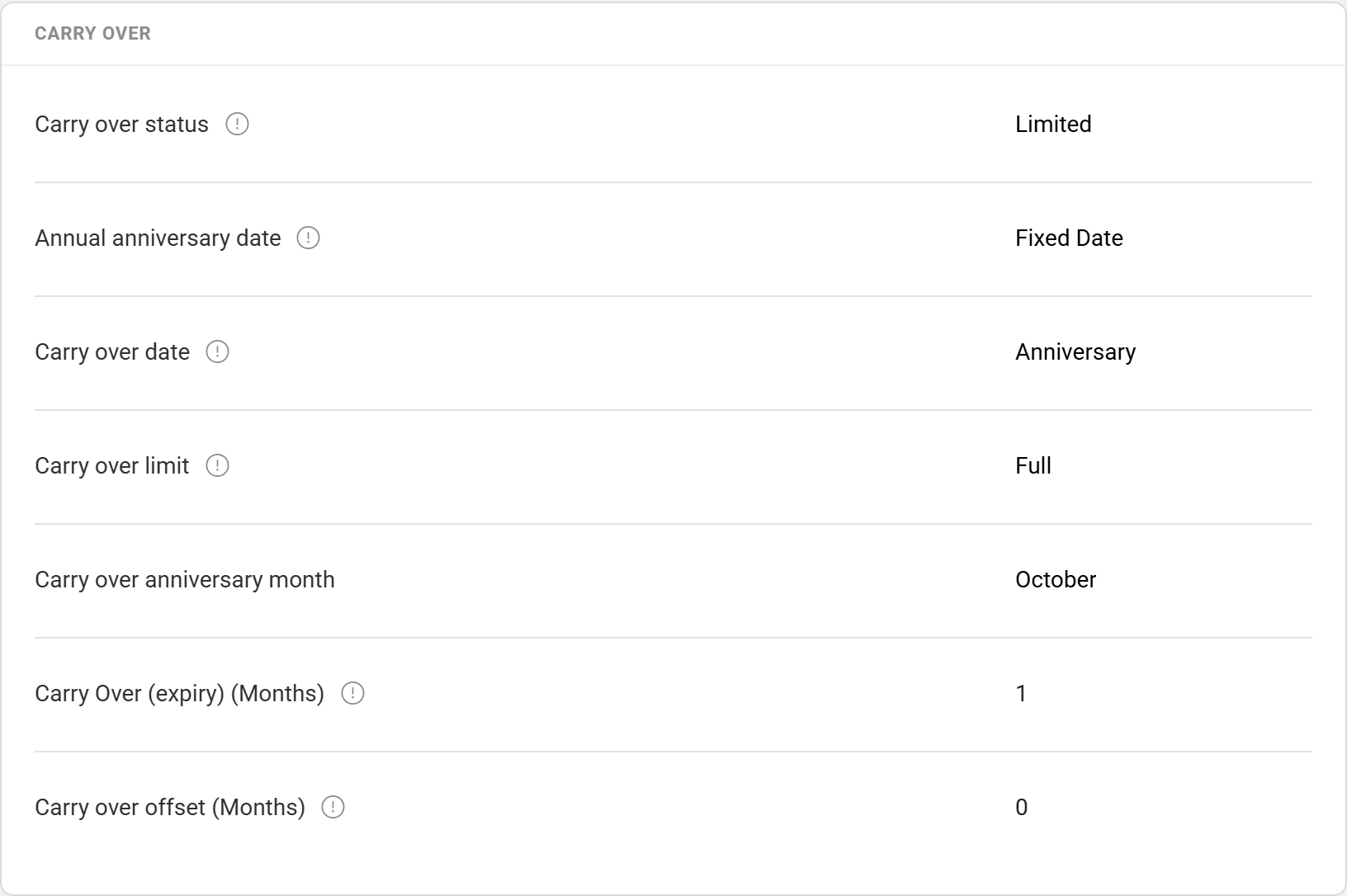
How to let people carry some days into the new year
This example carries up to 5 unused days, which then expire 3 months into the new leave year.
- In the Carry over card, set Carry over status to Limited.
- Set Carry over date to Anniversary.
- Set Carry over limit to Limited and Limit Days to 5.
- Set Carry Over (expiry) (Months) to 3.
- Leave Carry over offset (Months) at 0.
- Select Save.
How to set up birthday leave
- Create a leave type with Yearly awards accrued on, and give it 1 day a year in a leave policy.
- Set Annual anniversary date to Birthday.
- In the Carry over card, set Carry Over (expiry) (Months) to how many months the day stays usable. 1 means the birthday month only.
- Select Save.
The day arrives on the first of the employee's birth month and lapses when the months run out. Employees with no birth date on their profile do not get it.
What each setting does
When days arrive
| Setting | What it does |
|---|---|
| Accrual Interval | Monthly, Quarterly, Bi-annually or Annually. The yearly days from the policy are split evenly across these periods. |
| Accrual basis | Start awards a period's days when it begins, including the first month. End skips the first month, so days arrive in arrears. Annually with Start puts the whole year in the balance on day one. |
| Accrual limit | A cap in whole days. KAMI holds the balance at the limit, so nothing more is earned until leave is taken. Ignored for birthday leave. |
| Round Balance | Shows and checks the balance as a whole number. Exact halves round to the even number, so 2.5 becomes 2 and 3.5 becomes 4. Requests are checked against the rounded figure. |
Probation and new joiners
| Setting | What it does |
|---|---|
| Probation period block | On: the balance shows 0 while the employee is on probation, using the probation length on their profile. Off: probation is ignored and leave can be used from the start. |
| Probation accrual | Only matters while Probation period block is on, or a blackout period is set. On: those months still earn days, which all arrive when they end. Off: counting starts after them, so they earn nothing. |
| Leave blackout period (Days) | A number of days from the Leave Policy Start Date when the balance shows 0, for every employee, whatever their probation. Up to 365. With the block on, whichever is longer of this and probation applies. |
| Fixed date prorate | With a Fixed Date anniversary, a joiner's first award is cut to the months they work before the next award date. Off: they get a full period's award. |
The leave year
| Setting | What it does |
|---|---|
| Annual anniversary date | Hire Date, Fixed Date or Birthday. The date the leave year turns over and carry-over is worked out. |
| Anniversary day and Anniversary month | The fixed date. Days run from 1 to 28. |
Unused days
| Setting | What it does |
|---|---|
| Carry over status | Unlimited: days never expire. Limited: some days carry, then expire. No: the whole balance expires at the anniversary. |
| Annual anniversary date (in Carry over) | Hire Date uses the leave year. Fixed Date adds Carry over anniversary month, so carry-over is worked out in a different month from the leave year. |
| Carry over date | Anniversary: unused days become carried days at the anniversary and expire together. Award: each award expires on its own, the expiry months after it was given. With Award, Carry over limit and the offset have no effect. |
| Carry over limit | Full carries every unused day. Limited carries up to Limit Days (at most 100). |
| Carry Over (expiry) (Months) | How many months into the new year carried days survive. |
| Carry over offset (Months) | Delays the cut to Limit Days by this many months (0 to 11). Until then the whole unused balance can still be used. |
Leave taken in the new year uses carried days first, so they are the first to go rather than the first to lapse.
What Happens Next
- Balances change the moment you save. There is nothing to run.
- The employee's Leave tab shows when their next days expire, and how many.
- Unused leave that expires is not paid. To pay it out or move it before it expires, add a rule on Leave conversion and encashment.
- Leavers stop earning from their termination date.
Tips
- Decide carry-over with finance. Unlimited carry-over is a growing liability that payroll may have to pay out when people leave.
- Use an accrual limit or Limited carry-over on every annual leave type. One of them should stop balances growing for ever.
- Change these settings between leave years, not in the middle of one, and check three people in the Time Off Balances report before and after.
Troubleshooting / FAQ
Q: A new joiner has 0 days. Check Probation period block and Leave blackout period. Both show 0 until they end.
Q: Someone got the whole year's leave on their first day. Accrual basis is Start with Accrual Interval at Annually. Use Monthly to spread it.
Q: Unused days vanished at the new year. Carry over status is No, or carried days passed Carry Over (expiry).
Q: Why does the balance stop at a number? It has reached the Accrual limit.