Setting up the PhilHealth solo parent subsidy
From October 2026, PhilHealth covers the employee share of the premium for qualified employed solo parents. Use this article to record an employee's solo parent details in KAMI so payroll stops deducting their PhilHealth employee share. Your company still pays and remits the employer share in full.
Who this is for: HR Admins
Where: Profile › Personal tab › Identification & Registrations section
Before You Start
The subsidy is not automatic. Before you change anything in KAMI, confirm that the employee has both of the following:
- A valid Solo Parent ID Card (SPIC). This is the ID issued to qualified solo parents. Ask the employee for a copy and note the card number and expiry date.
- A PhilHealth tag. PhilHealth must have tagged the employee as an "Indirect Contributor – Employed Solo Parent". This shows on the employee's statement of premium account in EPRS, PhilHealth's online employer system. Note the first month the tag applies, because you will enter it below.
If PhilHealth has not tagged the employee yet, do not turn this on. Payroll would stop deducting before PhilHealth stops billing the employee.
Switch the PhilHealth deduction back on if you turned it off by hand
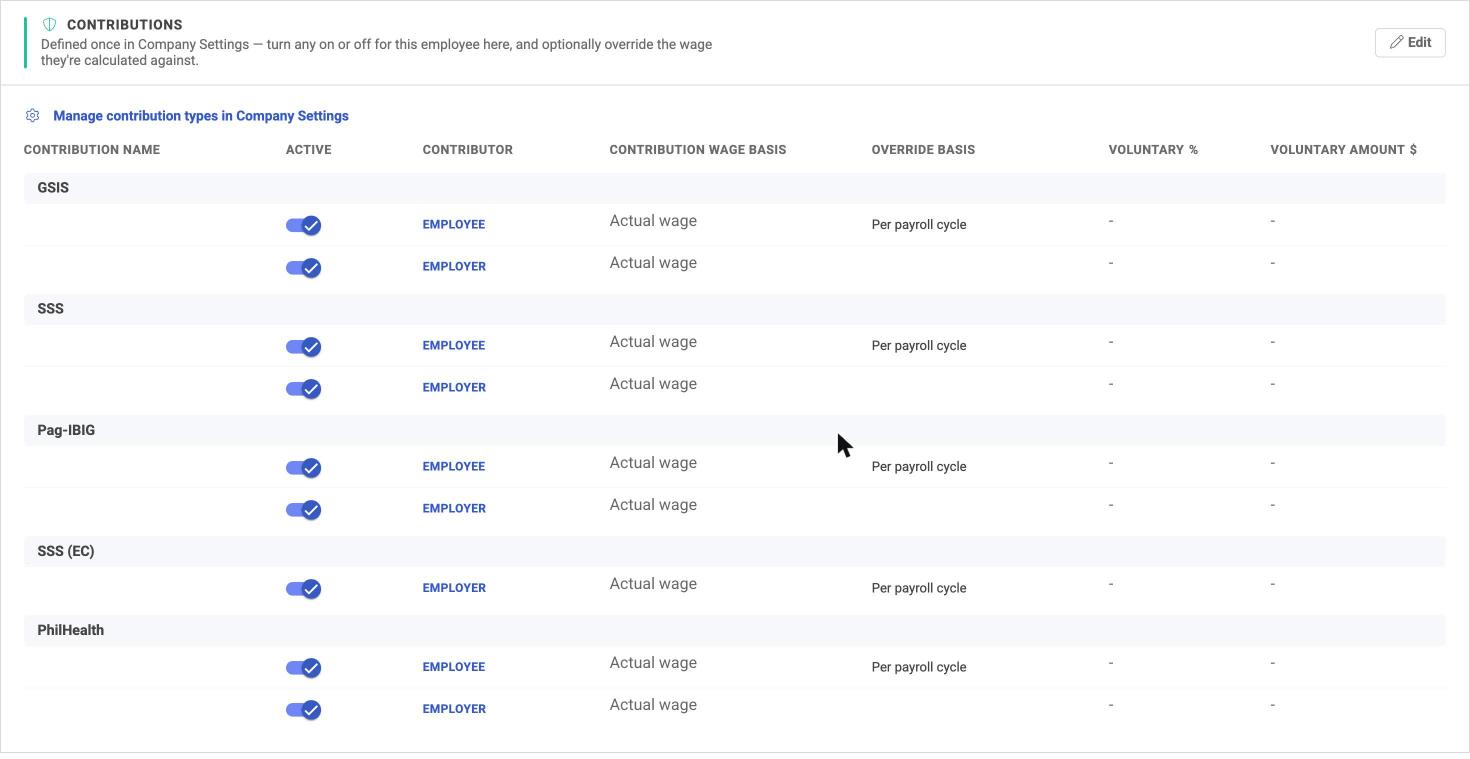
If you switched off the PhilHealth employee deduction on this employee's profile before this feature was available, switch it back on first. A manual switch has no dates, so it would keep the deduction off even after the SPIC expires. Once the solo parent fields are filled in, KAMI handles the dates for you.
- Open the employee's profile and go to the Payroll tab.
- In the Contributions section, click Edit.
- Make sure Active is on for the PhilHealth Employee row.
- Click Save.
How to Record a Solo Parent
- Open the employee's profile.
- Click the Personal tab.
- Scroll to the Identification & Registrations section.
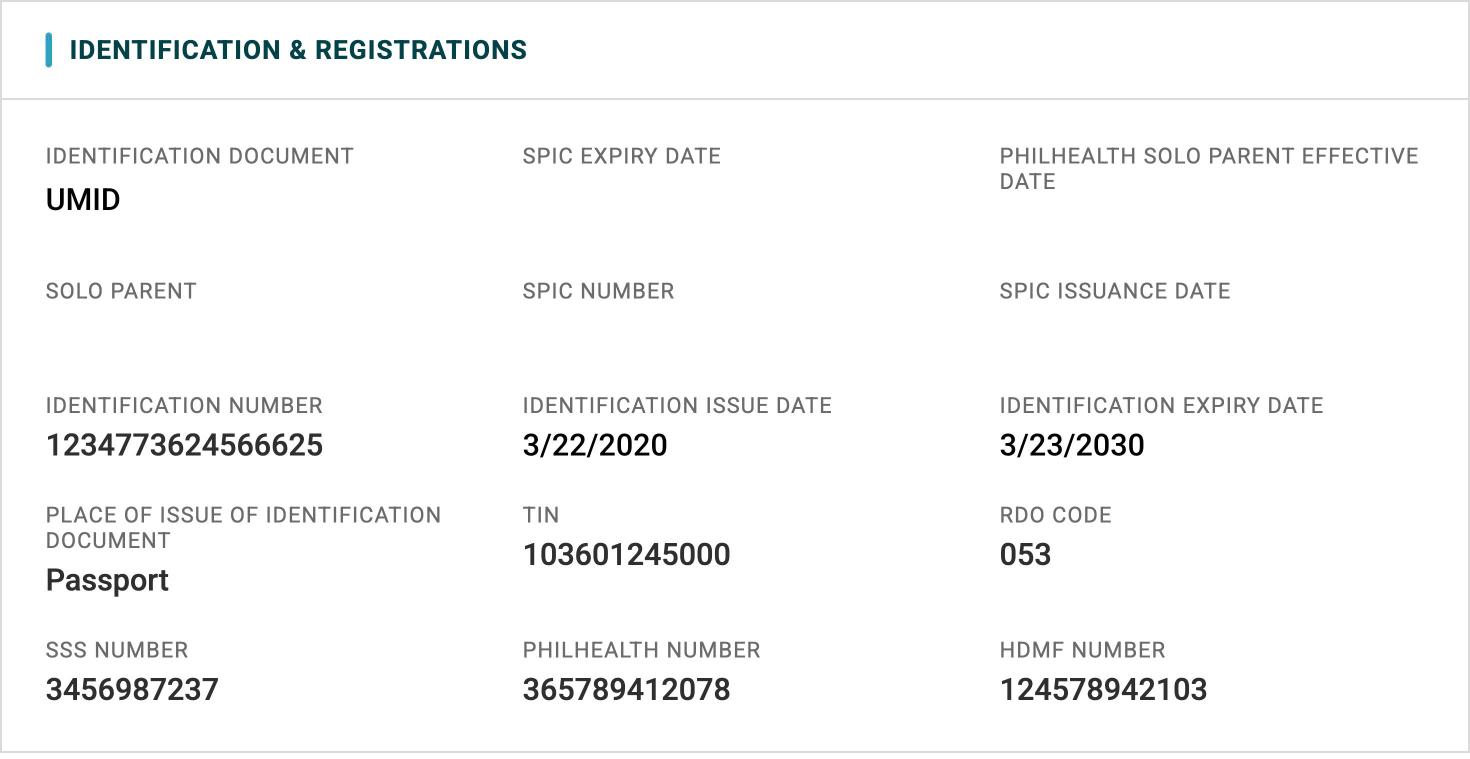
- Click Edit Data.
- Set Solo Parent to Yes.
- Enter the card number in SPIC Number.
- Enter the date the card was issued in SPIC Issuance Date.
- Enter the date the card expires in SPIC Expiry Date.
- Enter the first month PhilHealth tagged the employee in PhilHealth Solo Parent Effective Date. Use the month on the EPRS statement, not a date from the SPIC.
- Click Save.
If you do not see these fields, they may not be available for your account yet. Contact KAMI Support.
What Each Field Does
| Field | What to enter |
|---|---|
| Solo Parent | Yes for a qualified solo parent. The default is No. |
| SPIC Number | The card number, for your records and filings. |
| SPIC Issuance Date | When the card was issued, for your records and filings. |
| SPIC Expiry Date | When the card expires. Payroll compares months, so a card that expires on any day of a month still covers that whole month. Payroll starts deducting the employee share again from the following month. |
| PhilHealth Solo Parent Effective Date | The first contribution month PhilHealth has tagged the employee from. Payroll uses this date, not the SPIC dates, to decide when to start skipping the employee share. |
What Happens Next
When payslips are calculated, KAMI leaves out the PhilHealth employee share for a month only when all of these are true:
- Solo Parent is Yes.
- The month is on or after the PhilHealth Solo Parent Effective Date, and no earlier than October 2026.
- The card has not expired before that month, based on SPIC Expiry Date. A card that expires during the month still covers it.
For example, say an employee's PhilHealth employee share is ₱750 a month. Once the subsidy applies, that ₱750 is no longer deducted from their pay. Your company still pays its own ₱750 share.
The change applies to the next payslip calculation. Recalculate any open payslips that should be affected.
If the SPIC expires, the employee share comes back automatically from the month after the one the card expires in. When the employee renews the card, enter the new date in SPIC Expiry Date. You do not need to change anything else.
If the PhilHealth Deduction Is Still Showing
Check these in order:
- Solo Parent is Yes.
- PhilHealth Solo Parent Effective Date and SPIC Expiry Date are both filled in. If either is empty, the share is still deducted.
- The payroll month is October 2026 or later, on or after the effective date, and no later than the month the card expires in.
- The payslip has been recalculated since you saved the fields.
Tips
- Check the effective date before you save. Payroll follows the PhilHealth date, not the SPIC date. Using the wrong one can stop deductions too early or too late.
- Do not switch off the PhilHealth deduction by hand. A manual switch has no end date, so the deduction stays off even after the SPIC expires. The solo parent fields do the same job and respect the dates.
- Keep an eye on expiry dates. KAMI does not send an expiry reminder, so review SPIC expiry dates on a regular schedule. If a card lapses, the employee share is deducted again until you record the renewal.
- Make sure renewals are reported to PhilHealth too. Updating KAMI does not update PhilHealth. If a renewal is not reported to them, they may resume billing the employee share.
For how contributions are set up and calculated more broadly, see Contribution types.